Skip to content
MSP Process

HaloPSA AI VoiceAssist with Authenticator verification and SMS

FOR THE MODERN MSP

Your AI-powered service desk.
Built for MSPs.

Verify every user. Triage every request. Route every ticket, across every channel, without a tech lifting a finger.

  • Identity at every step
  • Native to your PSA
Form sentVERIFIED
End-User Verification
Verification MethodDuo
Send to(ticket contact)
  • Authenticator
  • Duo
  • SMS code
  • SMS link
  • Teams code
  • Email link
  • Client portal
  • Voice call
SendDuo push approved09:03

Based on the product

Trusted by 1,000+ MSPs and IT teams.

Read their stories
  • New Charter
  • Ntiva
  • All Covered
  • David Allen
  • S1 Technology
  • iTeam
  • In-Telecom
  • First Focus
  • Century Solutions Group

ONE TICKET, ONE STORY

One request.
Watch your pod work.

Your pod is the MSP Process workspace your techs work in. Seven stages, one new user. Pick a stage or let it play.

01 / Receive

Start anywhere.

A new starter, one request.

AMAlex asks in the portal. The pod matches the contact and opens the ticket.

02 / Verify

Verify first.

Prove who is asking first.

AMAlex approves a push on the Authenticator app. No codes read over the phone.

03 / Triage

Triage, handled.

AI reads it. Your team approves.

JLAI reads the request and fills the fields. A tech checks it and sends it on.

04 / Schedule

Book the setup call.

Book from your PSA.

JLJordan sends Alex a booking link for setup.

05 / CallScribe

Capture the conversation.

Call your client. Keep the notes.

JLJordan confirms the setup with Alex. AI CallScribe prepares the notes.

06 / Triggr

Approve once. Triggr runs.

A human approves. Triggr provisions and records.

JLJordan approves once. Triggr provisions, sends the link, closes the ticket.

07 / Complete

Close the loop.

Jamie is in. The ticket closes itself.

JPEvery action is on the ticket. Jamie is set up the same morning.

Explore the pod
MSP Process (Demo Sandbox)#1042 New user setupNew requestIdentity checkClassifiedAppointment bookedCall documentedProvisioningClosed
Workflow stages
AM

Alex Morgan

Northstar Studio

Client PortalNOT VERIFIED
New request09:02

Please set up Jamie Patel before the 16th.

New userJamie Patel
DepartmentDesign
Start date16 September
ManagerAlex Morgan
Channels
  • Client Portal
  • AI Voice
  • Teams
  • SMS
  • WhatsApp
  • Email
AM

Alex Morgan

Northstar Studio

Form sentNOT VERIFIEDVERIFIED
One-Click Verification
  • Authenticator
  • Duo
  • SMS link
  • Teams code
End-User Verification
MethodAuthenticator
Send toAlex Morgan (ticket contact)

Push approved on Alex's phone09:03

Audit saved to ticket #1042

AM

Alex Morgan

Northstar Studio

Service requestVERIFIED
AI ticketing triageAI filled 4 fields

Please set up Jamie Patel before the 16th.

TypeService request
SubtypeNew user setup
PriorityP3, start date
StatusReady for approval

Everything needed is present.

AM

Alex Morgan

Northstar Studio

VERIFIED
ScheduleAssist
MeetingNew user setup
TypeOne-to-one
TechnicianJordan Lee
  • Copy link
  • Email
  • SMS
  • Teams
AM

Alex Morgan

Northstar Studio

VERIFIED
AI CallScribe08:24
Jordan calls Alex about the new user setup.
  • Summary
  • Analysis
  • Time entry
  • Notes
  • Recording
  • Transcript

Jamie needs Microsoft 365 and access to the Design group.

JL

Jordan Lee

Dispatcher, one approval

APPROVED
Triggr Core run6 of 6
  1. Pax8 licenseSuccess09:04
  2. Create M365 userSuccess09:04
  3. Set propertiesSuccess09:05
  4. Groups and permissionsSuccess09:05
  5. Secure link to clientSuccess09:06
  6. Close the ticketSuccess09:06
AM

Alex Morgan

Northstar Studio

ClosedVERIFIED
Ticket #1042 timelineConnectWise synced
  1. 09:02Request captured
  2. 09:03Identity verified
  3. 09:05Approved by Jordan Lee
  4. 09:06Pax8 license assigned
  5. 09:08M365 user created, groups set
  6. 09:09Secure link sent, ticket closed

Ticket #1042 closed by Triggr

Choose a stage

See how this fits your service desk.

THE FULL STACK

Every capability.
Shown in context.

Pick a capability. Explore it in context.

  • MSP Process

    End User Verification

    Based on the product
    Form Not SentForm sentNOT VERIFIEDVERIFIED
    End-User Verification
    Verification MethodSelect a methodDuo
    Send to(ticket contact)
    • Authenticator
    • Duo
    • SMS code
    • SMS link
    • Teams code
    • Email link
    • Client portal
    • Voice call
    SendSendChoose a method to send the requestDuo push approved09:03
    • Authenticator
    • Duo
    • Teams
    • SMS
    • Email
    • WhatsApp
    • Client portal

    Confirm the person behind the support request.

    Explore End User Verification
  • MSP Process

    Technician Verification

    Based on the product
    Technician Verification
    VerifiedFromCodeCreated ↓TicketActions
    739 204#1042

    1–20 of 5,109‹ ›

    • Reverse verification
    • Live matching code
    • Branded verification
    • PSA audit

    Let clients prove it really is your technician.

    Explore Technician Verification
  • MSP Process

    AI Voice Verification

    Interactive illustration
    Alpha, AI VoiceAssist“How can I help you today?”Verified. Captured. Ticketed.
    1. Answer
    2. Verify
    3. Capture
    4. PSA
    • Caller matching
    • In-call MFA
    • Verified ticket
    • Audit record

    Confirm caller identity within the call.

    Explore AI Voice Verification
  • MSP Process

    Secure Data Sharing

    Interactive illustration
    Secure client handoffDocument and credentials•••• •••• ••••Identity-gated, single-useAccess recorded
    1. Verify
    2. Unlock
    3. Audit
    • Passwords and files
    • Credential bundles
    • One-time links
    • Access history

    Send sensitive data through verified, expiring links.

    Explore Secure Data Sharing
  • MSP Process

    Password Reset

    Interactive illustration
    Password resetAD / Microsoft 365•••• •••• ••••Identity-gated, single-useAccess recorded
    1. Verify
    2. Reset
    3. Audit
    • Active Directory
    • Microsoft 365
    • Single-use delivery
    • PSA documentation

    Verified resets through AI voice or the technician pod.

    Explore Password Reset
  • MSP Process

    Password Rotation

    Interactive illustration
    • Active Directory
    • Microsoft 365
    • Local accounts
    Rotation policyRotation recordedScheduled or on-demand
    • IT Glue
    • Hudu
    • MSP Vault
    • AD, M365 and local
    • Scheduled or on-demand
    • IT Glue and Hudu
    • MSP Process Vault

    Rotate credentials and update your documentation tools.

    Explore Password Rotation
  • MSP Process

    AI VoiceAssist

    Interactive illustration
    Alpha, AI VoiceAssist“How can I help you today?”Verified. Captured. Ticketed.
    1. Answer
    2. Verify
    3. Capture
    4. PSA
    • Inbound answering
    • Password resets
    • Appointment booking
    • Transcripts and time entries

    An AI service desk that answers, verifies and captures.

    Explore AI VoiceAssist
  • MSP Process

    Client Portal and Mobile App

    Interactive illustration

    Hi Alex. What can we help with?

    • My tickets
    • Knowledge base
    • Appointments
    • Invoices

    Your brand, one place for supportExample request captured

    • Tickets and templates
    • Knowledge base
    • Invoices and statements
    • Chat and verification

    Your branded home for every client interaction.

    Explore Client Portal and Mobile App
  • MSP Process

    Teams Chat Ticketing

    Interactive illustration

    Teams Chat Ticketing

    Client conversation

    Alex Morgan

    Hi, I can’t access my email.

    Northstar IT

    I can help. Let’s verify your identity first.

    MSP Process

    Identity confirmation requestedVerified, conversation logged
    • Branded Teams app
    • AI responses
    • PSA replies
    • Automatic time entries

    Support that stays inside Microsoft Teams.

    Explore Teams Chat Ticketing
  • MSP Process

    SMS / MMS Ticketing

    Based on the product
    SMS MessagingBack

    Hi Alex, is the printer working now?

    09:14

    Yes, all good. Please close it.

    09:16

    Ticket #1042, two-way with the PSATicket #1042 closed

    Type a message…

    Hide sensitive data As Internal Note

    • Business number
    • Photos and attachments
    • Ticket creation
    • Two-way PSA sync

    Two-way client conversations inside the ticket.

    Explore SMS / MMS Ticketing
  • MSP Process

    WhatsApp Messaging

    Interactive illustration

    WhatsApp Messaging

    Client conversation

    Hi, I can’t access my email.

    Alex Morgan

    I can help. Let’s verify your identity first.

    Northstar IT

    Identity confirmation requestedVerified, conversation logged

    • Business messaging
    • Photos and documents
    • Verification
    • PSA conversation history

    Bring WhatsApp conversations into your service desk.

    Explore WhatsApp Messaging
  • MSP Process

    Live Website Chat

    Interactive illustration

    Live Website Chat

    Client conversation

    Hi, I can’t access my email.

    Alex Morgan

    I can help. Let’s verify your identity first.

    Northstar IT

    Identity confirmation requestedVerified, conversation logged

    • Pre-chat questions
    • Agent paging
    • After-hours capture
    • PSA and CRM context

    Capture support requests and sales conversations.

    Explore Live Website Chat
  • MSP Process

    Mobile Tech App

    Interactive illustration
    MSP ProcessGood morning, JordanP2VPN supportNorthstar Studio, #104214:30Onsite visitTickets, schedule, on-call
    • Secure SMS
    • Live schedule
    • Mileage and expenses
    • Voice-to-ticket
    • Tickets and schedule
    • Chat, SMS and on-call
    • Mileage and expenses

    Your technicians’ workspace in the field.

    Explore Mobile Tech App
  • MSP Process

    AI ChatAssist

    Interactive illustration

    AI ChatAssist

    Client conversation

    Hi, I can’t access my email.

    Alex Morgan

    I can help. Let’s verify your identity first.

    Northstar IT

    Identity confirmation requestedVerified, choose an appointment

    • Portal
    • Teams
    • WhatsApp
    • Scheduling

    Chat intake, verification and appointment booking.

    Explore AI ChatAssist
  • MSP Process

    AI ticketing triage

    Interactive illustration
    AM

    Alex Morgan

    Northstar Studio

    VERIFIED
    AI ticketing triage

    “VPN keeps disconnecting.”

    TypeIncident
    SubtypeVPN issue
    PriorityP3
    StatusDispatcher review

    AI filled 4 fields

    Ready for your team's reviewExample fields written to the ticket
    • Type
    • Subtype
    • Priority
    • Status

    Turn incoming requests into dispatch-ready context.

    Explore AI ticketing triage
  • MSP Process

    ScheduleAssist

    Based on the product
    • Send link
    • Book now
    • Calendar
    Send link
    Send to
    TypeRemote supportRound robin
    • Copy link
    • Email
    • SMS
    • WhatsApp
    • Teams
    Send booking link
    Requests
    • Remote support, 30 minPendingBooked Tue 10:30
    • Pending
    • Pending
    • Send link / Book now
    • Round robin
    • PSA calendar invites
    • Voice and chat booking

    Coordinate the next conversation from inside the pod.

    Explore ScheduleAssist
  • MSP Process

    AI CallScribe

    Based on the product
    Contact(ticket contact)
    • All (5)
    • Unanswered (1)
    08:24In call 00:42 CompletedTime posted1 action item
    • Summary
    • Analysis
    • Time entry
    • Notes
    • Recording
    • Transcript

    Summary, time entry and notes post when the call ends0.25 h posted to #1042

    • Summary, analysis
    • Time entry, note-taking
    • Recording
    • Transcript

    Make outbound calls. Capture the work automatically.

    Explore AI CallScribe
  • MSP Process

    Quick Ticketing

    Interactive illustration
    New ticketReady for reviewCreated in your PSA
    Voice dictation

    From your technician’s mobile app

    “Create a ticket for Alex Morgan at Northstar Studio. The VPN keeps disconnecting.”

    7 ticket fields filled

    Ticket details
    Ticket titleVPN keeps disconnecting
    CompanyNorthstar Studio
    ContactAlex Morgan
    TypeIncident
    SubtypeVPN issue
    PriorityP3
    Service boardService Desk
    Review the details, then create the ticket.Ticket #1043 created. Confirmation returned to your tech.
    • Voice dictation
    • Teams, SMS and portal
    • AI-extracted fields
    • PSA confirmation

    Capture the extra work while your tech is still there.

    Explore Quick Ticketing
  • MSP Process

    On-Call Scheduling

    Interactive illustration
    After-hours service deskExample activityP1Client network offlineVerified caller, asset context, ticket #1042
    1. Primary on-callExample step 1Complete
    2. Backup technicianExample step 2Complete
    3. Escalation managerExample step 3Complete
    • Rotations and overrides
    • Severity-based rules
    • Retry and escalation
    • Verified handoff

    Coordinate coverage, paging, and escalation.

    Explore On-Call Scheduling
  • MSP Process

    Incident Response

    Interactive illustration
    After-hours service deskExample activityP1Client network offlineVerified caller, asset context, ticket #1042
    1. Primary on-callExample step 1Complete
    2. Backup technicianExample step 2Complete
    3. Escalation managerExample step 3Complete
    • Mobile acknowledgment
    • Caller and asset context
    • Multichannel paging
    • Escalation history

    Give the responding tech the full incident context.

    Explore Incident Response
  • MSP Process

    Automation Bots

    Interactive illustration
    Ticket status changed
    • TeamsReadyLogged
    • SMSReadyLogged
    • EmailReadyLogged
    • SlackReadyLogged
    Event, rule, recipient, delivery logExample delivery history recorded
    • Ticket lifecycle
    • Schedule changes
    • Custom conditions
    • Delivery and fallback

    Turn PSA events into the right notifications.

    Explore Automation Bots
  • MSP Process

    Outbound Notifications

    Interactive illustration
    Your technician is on the way.
    • TeamsReadyLogged
    • SMSReadyLogged
    • EmailReadyLogged
    • VoiceReadyLogged
    Event, rule, recipient, delivery logExample delivery history recorded
    • Teams and SMS
    • Email and voice
    • Event-driven sends
    • Delivery tracking

    Keep clients and technicians informed.

    Explore Outbound Notifications
  • MSP Process

    SMS Broadcast

    Interactive illustration
    We’re investigating a service disruption.
    • TeamsReadyLogged
    • SMSReadyLogged
    • EmailReadyLogged
    • VoiceReadyLogged
    Event, rule, recipient, delivery logExample delivery history recorded
    • PSA contact groups
    • Outage and maintenance
    • Saved templates
    • Replies and delivery status

    One update for everyone affected.

    Explore SMS Broadcast
  • Triggr by MSP Process

    TriggrCore

    Product screenshot
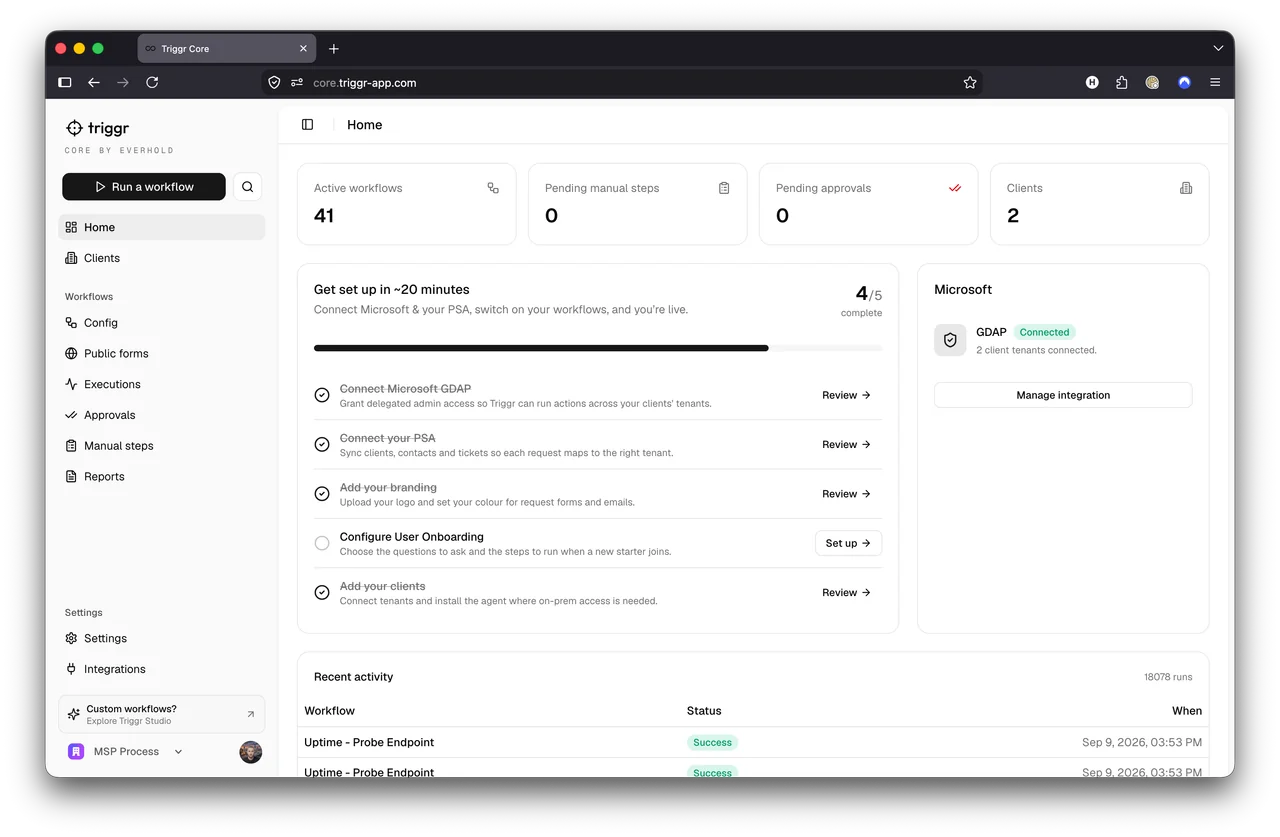
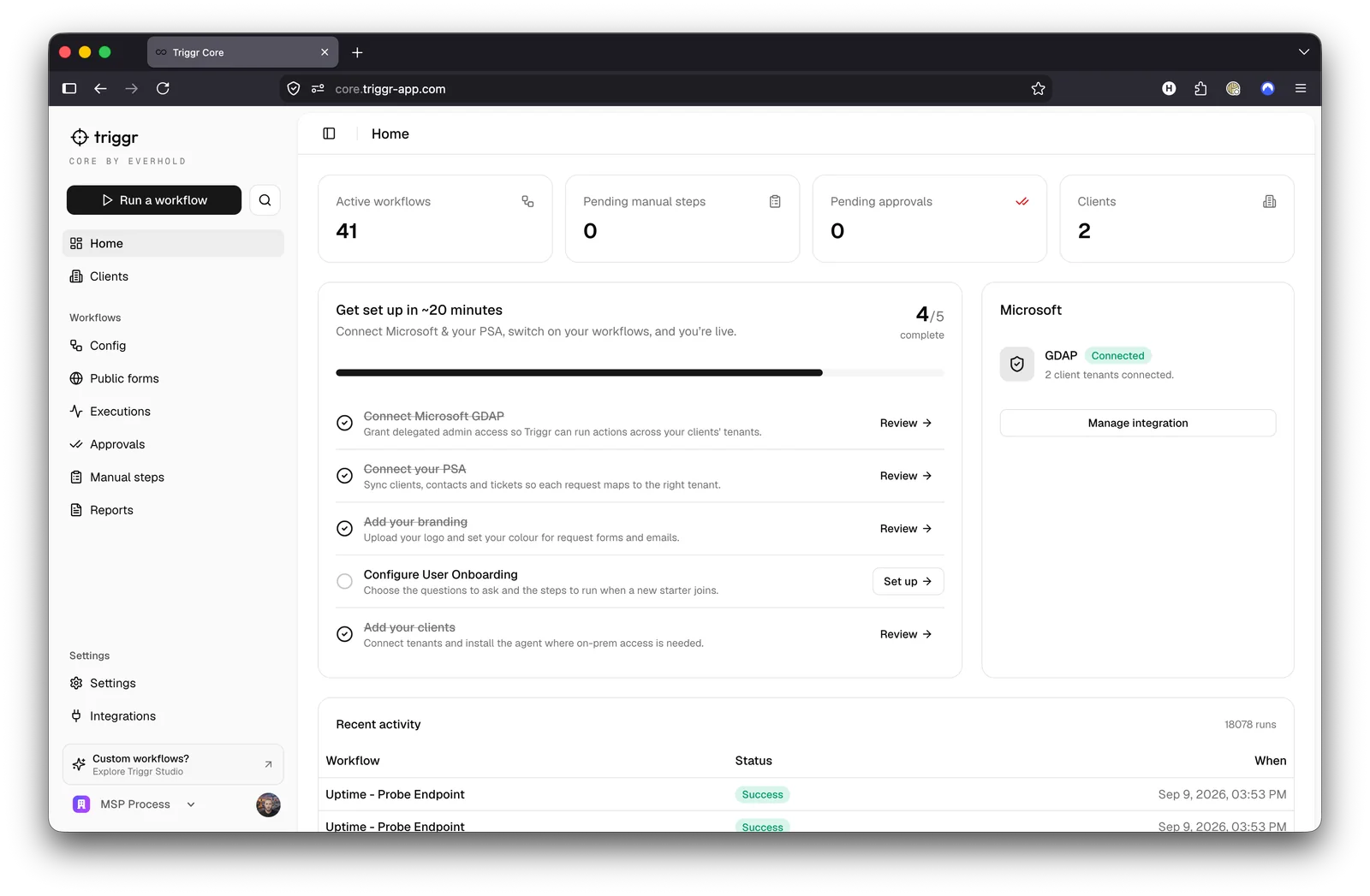
    Triggr Core: the automation catalogue with a workflow open
    • 41 catalog workflows
    • Guided setup
    • Client overrides
    • Approvals and self-service

    Ready-made automation for repeat service-desk work.

  • Triggr by MSP Process

    Core Configuration

    Interactive illustration
    ClientNorthstar StudioRequestNew user onboarding
    First nameAlexDepartmentOperations
    Microsoft sign-in, approval policy
    • Form fields
    • Execution settings
    • Client mappings
    • Approval routing

    Set your defaults. Adapt to each client.

  • Triggr by MSP Process

    Core Reporting

    Interactive illustration
    Report content
    • Licensing
    • User lifecycle
    • Access requests
    Schedule deliveryIllustrative report preview
    • License reports
    • Scheduled email
    • Recipient and timezone
    • Saved reports and CSV

    Run and schedule the reports clients need.

  • Triggr by MSP Process

    Studio Workflow Designer

    Product screenshot
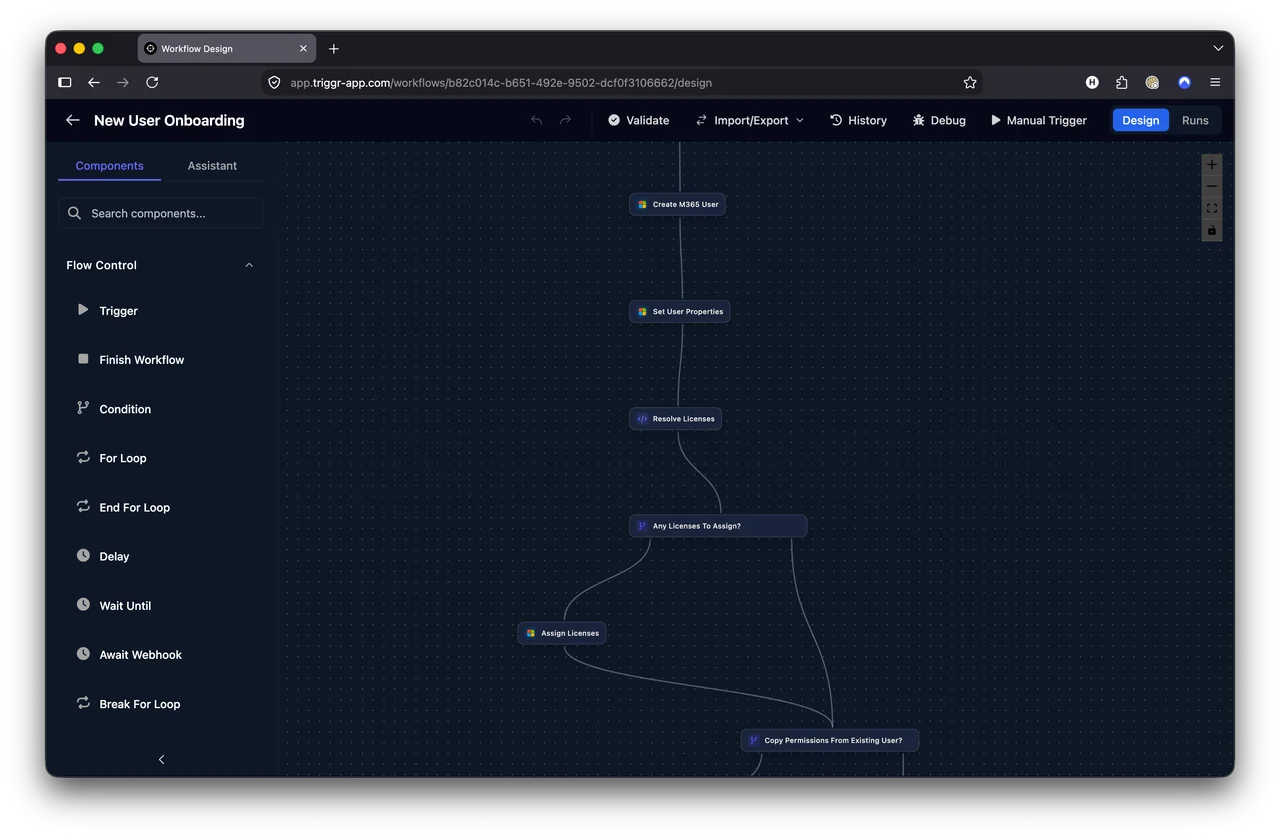
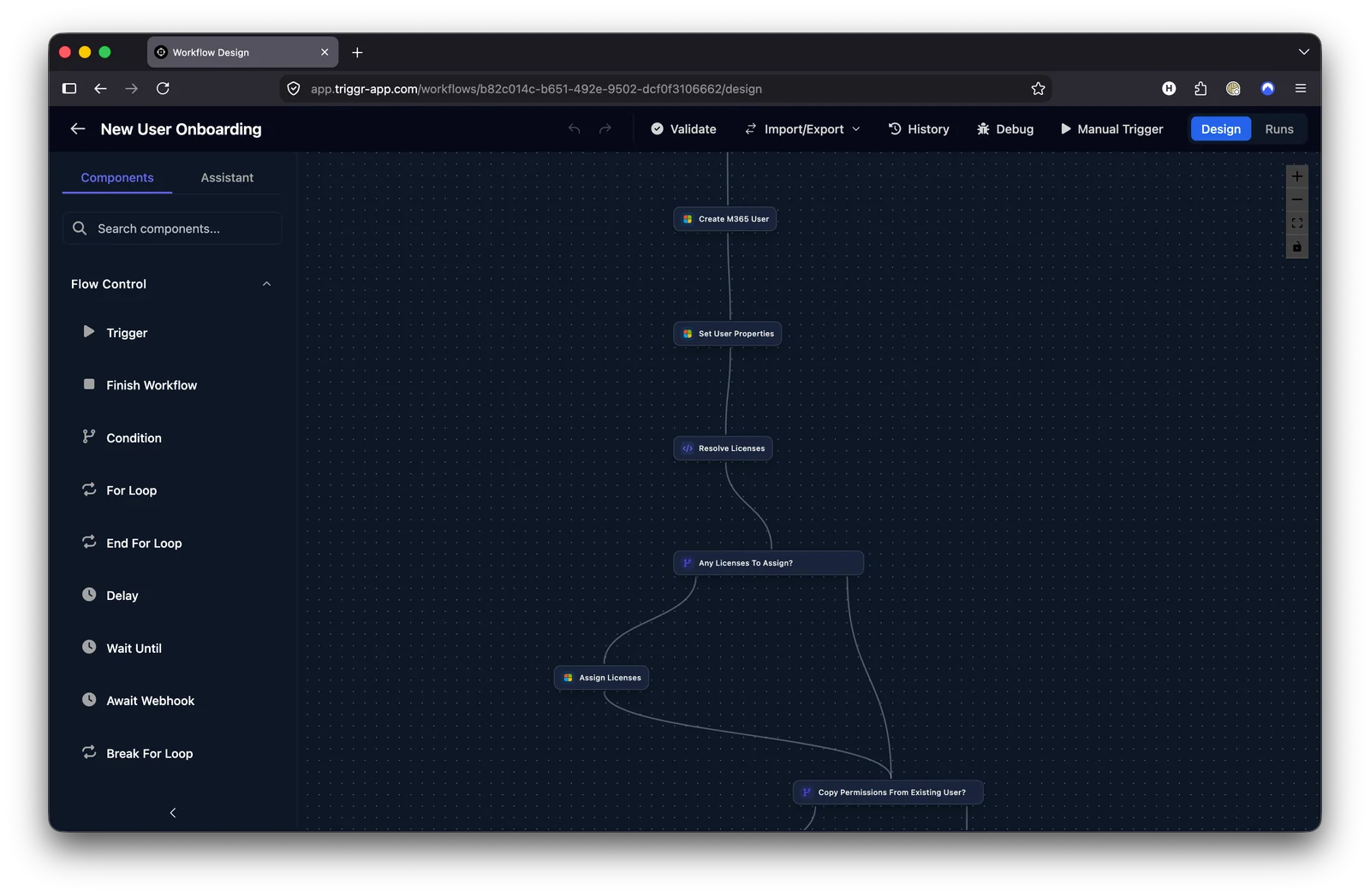
    Triggr Studio: a custom workflow on the canvas
    • Conditions and loops
    • Manual and cron triggers
    • Forms and webhooks
    • History and debugging

    Connect your systems with your own logic.

  • Triggr by MSP Process

    Forms and Internal Apps

    Interactive illustration
    ClientNorthstar StudioRequestNew user onboarding
    First nameAlexDepartmentOperations
    Microsoft sign-in, approval policy
    • Branded forms
    • Microsoft sign-in
    • Client selection
    • Connected apps

    Turn the right information into the right action.

  • Triggr by MSP Process

    Studio Client Portal

    Interactive illustration

    Hi Alex. What can we help with?

    • New starter
    • Access request
    • Mailbox request
    • Business apps

    Your brand, one place for supportExample request captured

    • Signed-in users
    • Relevant requests
    • Client apps
    • Workflow entry points

    One branded home for available forms and apps.

  • Triggr by MSP Process

    Operations Monitoring

    Interactive illustration
    Workflow operationsExample activityREVIEWApproval requiredAccess request, Northstar Studio
    1. Run receivedExample step 1Complete
    2. Review taskExample step 2Complete
    3. Approval recordedExample step 3Complete
    • Pending approvals
    • Manual tasks
    • Execution status
    • Recent activity

    See the work running and the work waiting.

    Explore Operations Monitoring
  • Triggr by MSP Process

    Reporting Decks

    Interactive illustration
    Report content
    • Licensing
    • User lifecycle
    • Access requests
    Build the conversationIllustrative report preview
    • AI-assisted slides
    • Client reporting
    • Theme controls
    • Present and export

    Turn connected data into client conversations.

  • Triggr by MSP Process

    MCP Access

    Interactive illustration
    1. Your AI toolExample step 1Complete
    2. Scoped MCP accessExample step 2Complete
    3. Forms, workflows, appsExample step 3Complete
    • Forms and workflows
    • Internal apps
    • Execution details
    • Full or scoped access

    Build and inspect Studio through compatible AI tools.

  • Triggr by MSP Process

    Hawk

    Interactive illustration
    Repeat work
    • Licensing
    • User lifecycle
    • Access requests
    Find the opportunityIllustrative opportunity ranking
    • 90-day ticket review
    • Read-only PSA access
    • Opportunity ranking
    • Estimated time savings

    Find automation opportunities in your ticket history.

  • Triggr by MSP Process

    Done-for-you Services

    Interactive illustration
    1. Discover and scopeExample step 1Complete
    2. Build and testExample step 2Complete
    3. Review and maintainExample step 3Complete
    • Discover and scope
    • Build and test
    • Review and approve
    • Run and maintain

    Add expert delivery to your Studio platform.

34 capabilities to exploreSee the platform overview

PART OF THE FAMILY

Triggr

Your automation.
Now part of the process.

MSP ProcessTriggr

Verify Act Record

REQUEST TO FINISHED WORK

Follow the work all the way through.

An offboarding request, verified. Your dispatcher approves once. Triggr disables sign-in, reclaims the license, hands mail over, removes access and closes the ticket. Every step lands in the audit.

Example: user offboarding
Paused
  1. TRIGGERUser Offboarding Request
  2. Dispatcher approves
  3. Disable sign-in
  4. Revoke sessions and MFA
  5. Reclaim the M365 license
  6. Forward mail, shared mailbox
  7. Remove groups, move OneDrive
  8. OUTPUTClose the ticket
Follow the connected workflow.

WORKS WHERE YOU WORK

Your stack.
Now more connected.

  • ConnectWise PSA
  • Datto Autotask
  • HaloPSA
  • Syncro
  • Kaseya BMS
  • SuperOps
  • Freshservice
  • ServiceNow
  • IT Glue
  • Hudu
  • Lexful
  • Microsoft Teams
  • Microsoft Authenticator
  • Duo
  • Active Directory
  • Microsoft Entra ID
  • Zendesk
  • Rewst

Explore all integrations

MAKE EVERY INTERACTION COUNT

Your next chapter.
One process away.

A personal walkthrough. Built around your service desk.

LET'S TALK AUTOMATION

See MSP Process
in action.

Book a demo with our team. We'll walk through the platform and answer your questions.

  • A 30-minute demo, at a time that suits you.
  • Works with the PSA you already run.
  • No pressure. No mailing list.
+1
Add a note (optional)

Pick your time on the next step. No spam, ever. Privacy policy